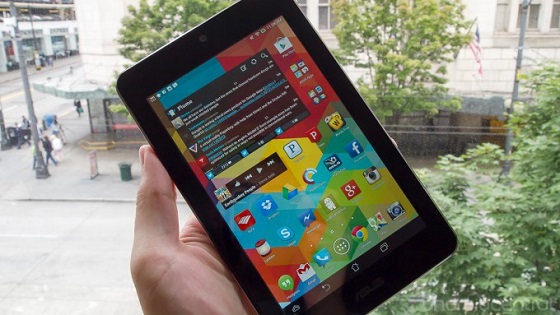
Technical features MeMO Pad HD7
To reduce the cost of the new model , ASUS has greatly simplified the tablet, but it did not affect the productive capabilities gadget. Thus , the device is equipped with a quad-core ARM Cortex A7 with a frequency of 1.2 GHz , RAM 1 GB of internal memory and an 8 or 16 GB (there is a slot for microSD). Battery capacity - 3890 mAh. Screen IPS - 7 inches with a resolution of 1280x800. Front is 1.2 - megapixel camera, and the back - 5 - megapixel , which we consider below.
build Quality
The build quality of this device is fully consistent with the standards adopted for budget tablets. Gadget design is almost identical to the Nexus 7 : the same size and layout of the buttons. The only thing , ASUS suffered a headphone jack and a MicroUSB port at the top of the device , but the volume control, power button and speakers remain in their original locations .
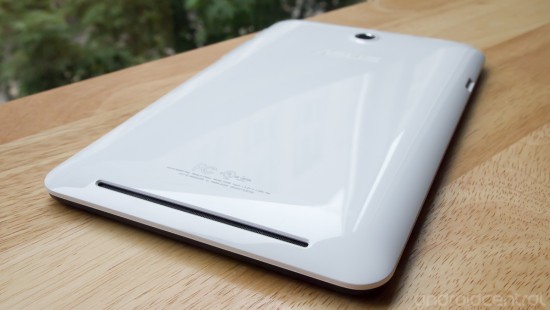
From Nexus 7 tablet MeMO Pad HD7 distinguished by the quality of the materials used . In the new model ASUS focused on , as already mentioned , the lower end of the market , so the light was used for the glossy plastic back and sides . This material is not particularly aesthetic , but pleasant to the touch. MeMO Pad HD7 comes in several colors: all black model, and 4 two-color - black with pink, green, blue and white. ASUS also offers a variety of color covers for this tablet.
While the back panel is secured to the tablet , the gadget nevertheless has a slightly unfinished appearance due to the protruding edge around the perimeter of the device. The edges of the rim is not sharp, but they give the impression of a production oversight, because of which the rear panel appears on the sides of a few millimeters . The front panel is reminiscent of the original design of the Nexus 7 - the same wide frame , so you can safely hold the tablet is not afraid to touch the screen .
At first glance , MeMO Pad HD7 compiled fine, but if you put pressure on him , you can hear the creaking . This is because the plastic was used normal quality , but still you can be sure that the tablet does not fall apart in your hands.
It should also be noted that the body can slide the tablet in your hands, although it is quite comfortable to hold . In addition , the device is pretty easy - just 302 grams. Cost Tablet - $ 150 - is fully consistent with its quality and features . Without certain drawbacks company could offer such a low price.
ASUS is known for high-quality sets screens for tablets based on Android, but the new model, the company has decided to step back from this rule. Again, this is due to the desire to reduce the cost of the gadget. Therefore, it is equipped with IPS- display with a modest resolution of 1280x800 (213ppi), in addition, the developers had to go to other concessions.
In particular , referring to the image sharpness and brightness , the tablet is fully satisfied the Nexus 7 , but as for the contrast and viewing angles , the situation is a little worse. Color reproduction is inferior screens other similar devices. The viewing angles are acceptable, but if you look at the side of the screen , the brightness is not enough.
Most of these drawbacks stems from the fact that the display plate is not " laminated " (in other words, between the screen itself and the glass which covers it , there is a certain space). " Laminate " displays have become the norm in our time , so it is easy to see when the gadget is equipped with a screen of another type.
However, it is recognized that the display tablet HD7 is much better than you would expect. Even those deficiencies that have found no way affect the performance of the device. By and large, for such a low cost tablet display this quality real find .
Speakers
ASUS stated that the tablet MeMO Pad HD7 is equipped with stereo speakers, but turning the device , you can be sure that , as in the Nexus 7 and in the HD7, there is only one speaker on the rear panel. Playing games or just listening to music, you can enjoy the superb sound quality , but any " stereo " out of the question . If you want to get a good sound , it is better to use headphones .
connectivity
MeMO Pad HD7 supports Wi-Fi b / g / n, Bluetooth 4.0, GPS. It also has a standard dial gauges. The only thing that 's not here, so it's NFC sensor and ambient light that suggests a lack of options for automatic correction of brightness.
Battery life
Under the glossy case HD7 hiding non-removable lithium -polymer battery capacity of 3890 mAh. Despite the fact that the tablet is considered to be the budget , the processor consumes little power and during the testing device showed a fairly long life . As most tablets , HD7 standby may be several days. Most energy is the screen , especially at high brightness. ASUS has said that the MeMO Pad HD7 can work up to 10 hours (continuous use ), which was confirmed during our test device.
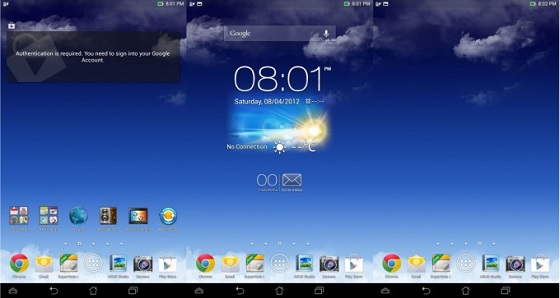
As for the programs, ASUS has used his experience of previous models , equipping the new tablet operating system Android 4.2.1.
If you have ever used a 7- inch tablet based on Android 4.2, a new model with the interface you get comfortable in a jiffy . Mostly cosmetic changes : instead of a dark theme became lighter , changed the design of folders, and the status bar became transparent .
ASUS has changed the way the button works go to the home screen. Now it is used to quickly launch applications , and access to settings and some built-in applications , which are responsible for the performance of the tablet. Has been added to another control panel, which is activated by pressing the button in the lower left corner. It provides quick access to many more applications. We found these two innovations useless , because you have to use them very rarely.
In any case, you can disable the ASUS tweaks in the system tray . The default settings can be changed in the "User Settings ASUS», the main thing - do not forget to uncheck the option to "Use the quick settings ASUS». So you can go back to the standard notification Jelly Bean. Certainly , ASUS would cost to give users access to a wider range of settings.
Performance and practicality
With a quad-core Cortex A7 and 1 GB of RAM , you can not count on the speed and uptime of the gadget. Thus, application downloading takes a few seconds more, and scroll speed will be low. It is clear that , despite the compromises that had to go to ASUS, to reduce the cost of the tablet , the performance HD7 is at a fairly high level , given the limited resources with which to work device.
Camera MeMO Pad HD7
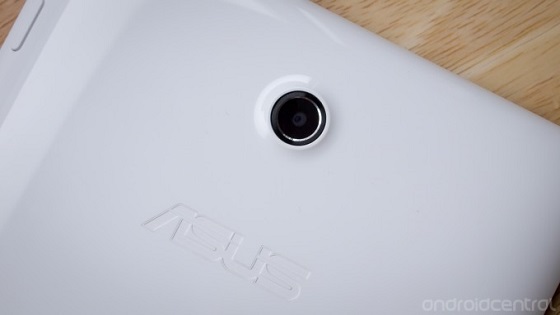
Although the company did ASUS tablet budget , yet was left in the HD7 5 - megapixel camera on the back . In addition , the camera interface and the software offers a wide range of options .
For example , you can use different camera modes - HDR, panorama , night , portrait and landscape photography. Also available are various artistic filters . In manual mode, you have access to fast exposure setting , the definition of white balance , ISO (50-800), timer, burst mode and several modes of focusing down to face recognition , as well as the display of grid lines. The camera interface allows easy access to the settings or hide them during the shooting process . Design flaws are compensated fully functional camera.
There is also a 1.2 - megapixel front-facing camera, which is ideal for video conferencing. However, its quality leaves much to be desired .
MeMO Pad HD7 records video in 1080p ( the default). Overall impression of the shooting went well : color reproduction at a decent level , in addition , the camera measures the most successful ratio of the brightest and darkest areas of the image . However, if you quickly move your tablet while shooting , the image is jumping . Again, if you have a steady hand , the quality of video HD7 will be on top.
conclusion
The test results MeMO Pad HD7 is really impressive. It's amazing how many features , ASUS has managed to put a 7 -inch tablet costing only 149 U.S. dollars. With the exception of minor missteps as an assembly HD7 has serious shortcomings. You get a great display and optimized performance for superdostupnoy price.
At the same time, by paying a small fee , you can buy another 7- inch device with more features . A striking example - the same new Nexus 7 February . But if that is important to you the lowest price , the ASUS MeMO Pad HD7 - the best option for purchase.

All the detectives know the power of Asus Memo Pad HD7?
ReplyDelete1. ♥ Miracast ( http://memopadhd7.gweb.io/miracast.html )
2. ♥ Time-Lapse
3. ♥ Smart Cover ( http://memopadhd7.gweb.io/transcover.html )
4. ♥ more later ...
Like us to get the cool update for your Memo Pad HD7
http://fb.com/memopadhd7 ♥